Introduction
An 86% of consumers,
according to a survey from Chase Bank, would like to handle all aspects of
their finances through one mobile application instead of using the website and
visiting the bank branch and keeping track of everything through some kind of
budgeting app. This trend has forced banks to focus on a part of business that
was previously considered secondary, that is, the app itself.
Capital One currently
ranks as the top free banking app in Apple's App Store Finance category, with
Chime, Chase, and Wells Fargo close behind. This guide looks specifically at
what separates a genuinely useful banking app from a mediocre one in 2026,
security architecture, budgeting tools, everyday usability, and how the leading
apps actually compare feature by feature.
This guide is deliberately
focused on the app experience itself rather than the underlying bank's rates or
fee structure, those factors are covered in depth elsewhere. What matters here
is a narrower but genuinely important question, once you have money in an
account, does the app actually make it easier to manage, protect, and
understand that money day to day, or does it just sit there as a thin digital
window onto a balance.
This article is part
of our larger complete
guide to banking in 2026, and it complements our best online banks
of 2026 guide, which focuses more on rates and account terms than the app
experience itself.
What
Actually Makes a Banking App Good in 2026
This article is one
of the many articles that constitute our complete guide to banking in 2026, and
it works excellently with our guide to the best online banks in 2026, which
focuses more on rates rather than the friendliness of the application.
• Security
architecture: the nonnegotiable baseline. If there is nothing
in place to secure the system, all else is meaningless, but if it is done
right, then security itself becomes a real competitive edge.
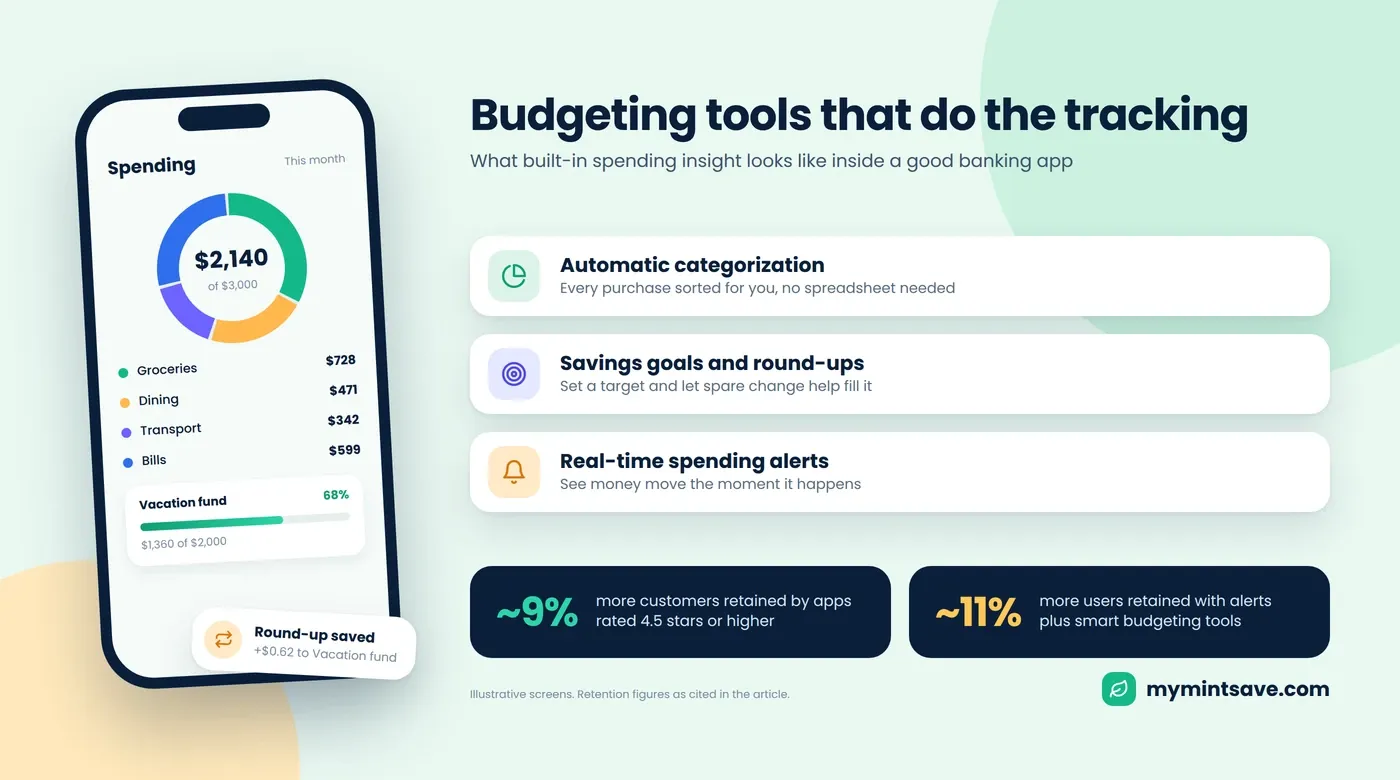
• Budgeting
and expenditure insights: includes built-in category tagging,
expenditure trends, and savings goals management, functionality that formerly
required the use of a third party app altogether.
• Real-time
alerts and card control: provides you with real-time
notification for any transaction, and allows you to block or unblock your card
in seconds if it gets lost or if there is a suspicious charge.
• Peer
to peer payments: built in support for Zelle or a similar
instant transfer service, now considered a baseline expectation rather than a
bonus feature.
• Mobile
check deposit and account aggregation: the ability to
deposit a check by photo and, increasingly, to see balances from external
accounts alongside the primary bank's own accounts within the same view.
• Customer
support access: live chat or in app messaging that does
not require a phone call, particularly valued for quick account questions.
However, there are
common traits that should not be overlooked about these five categories. All of
them lack the showiness of an altered color palette or new app logo since they
all serve purely practical purposes and become recognizable only when they are
not present in an app. It is not going to make itself known when an app lacks
real-time alerts; it just means that fraud will take longer to detect. An app
without strong budgeting tools does not fail loudly, it just leaves a user
guessing at their own spending patterns instead of seeing them clearly laid
out.
Security:
The Feature That Matters Most
Security in banking
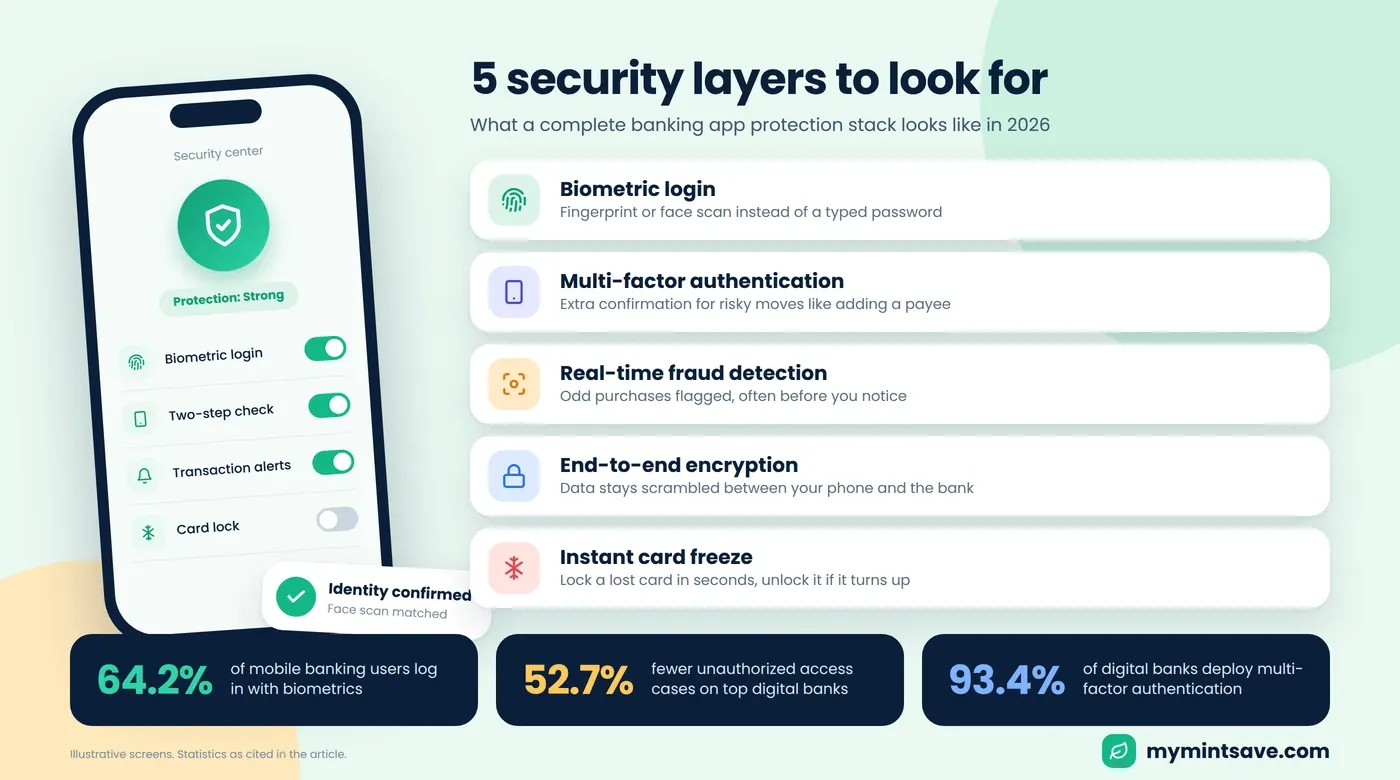
apps has evolved considerably, and the numbers show just how far adoption has
come. Biometrics have become the preferred way of logging in, with 64.2% of
mobile banking customers using biometric security through fingerprints or face
recognition as their main mode of login, while biometric security has lowered
the risk of unauthorized access by 52.7% for leading digital banks.
• Biometric
login: the norm instead of an exception now, being
both faster than passwords, and more difficult to spoof.
• Multi
factor authentication: used by 93.4% of digital banks,
consisting usually of a password together with one time use codes, or biometric
authentication, for high-risk transactions such as adding a payee.
• Real time fraud detection:
AI driven systems that detect and flag any suspicious transactions immediately,
sometimes stopping the transaction before the customer becomes aware of it.
• End
to end encryption: protects data as it travels between the
app and the bank's servers, a baseline requirement that every reputable banking
app implements, worth confirming for any newer or lesser known app before
trusting it with real money.
• Instant
card freeze: the ability to lock a card immediately from the
app if it is lost or stolen, then unlock it just as quickly if it turns up
again, without waiting on hold with customer service.
Generally speaking, a good stack of security measures in 2026 would consist of all of the above combined, along with biometric authentication, multi factor authentication for high stakes actions, end to end encryption, fraud monitoring using artificial intelligence, and instant card controls. An application lacking a few of these elements would need to be treated with a lot of caution, no matter how well designed the user interface is.
Having an idea about how these different elements fit into each other is helpful in understanding their role and value. Biometric authentication guarantees that the person logging in actually opens an application literally verifies that the phone holder is who he claims to be at a device level. Multi factor authentication provides a second confirmation of identity but specifically for high stake operations such as changing a password or making a transfer to a new payee. Fraud monitoring works in the background constantly and regardless of the way of logging in, identifying suspicious activity such as purchasing goods outside the state after a local purchase.
Comparison
of Leading Banking Apps
|
App |
Standout Feature |
Best For |
|
Chase Mobile |
Live chat,
free credit score access |
Full service
banking in one app |
|
Capital One |
Highest rated
free app, budgeting tools |
Overall
usability and ratings |
|
Chime |
SpotMe
overdraft protection, early pay |
Fee-free
everyday banking |
|
Ally Bank |
Savings
buckets, round-ups |
Full-service
online banking |
|
Bank of
America |
Erica AI
assistant, budgeting insights |
AI-powered
spending guidance |
|
SoFi |
Integrated
investing and lending |
Consolidating
finances in one app |
|
Wells Fargo |
Budgeting
tools, wide ATM network |
Traditional
bank with strong app support |
Individual
App Highlights
Chase Mobile: Best for Full Service Banking
Chase's app
consistently ranks among the most downloaded banking apps, combining account
management, live in app chat, and free access to credit scores in one place.
For anyone who wants a single app handling everything from daily spending to
occasional customer service questions, Chase remains a strong benchmark.
Capital One: Best Overall Ratings
Capital One stands
out to be the best-rated free banking application in the Finance section of
Apple's App Store. This is attributed to the quality of its budgeting features
and transaction classification features among others, which have won it many
accolades from unbiased testing agencies.
Chime: Best for Fee-Free Everyday Use
Chime built its
entire reputation around app based banking specifically, and features like
SpotMe fee free overdraft coverage and early direct deposit access are baked
directly into the everyday experience rather than tucked away as an
afterthought.
For a deeper
comparison of Chime and other online banks, including rates and fees, see our best online banks
of 2026 guide.
Bank of America: Best AI Assistant
The Erica AI
assistant from Bank of America has evolved into a truly helpful AI tool that
offers insight into one’s spending habits, highlights any weird transactions,
and even answers queries about your bank accounts all through the chat feature
in their app.
Ally Bank: Best for Organized Savings
What makes Ally's app distinctive is its handling of savings
in the sense that it allows you to subdivide one savings account into a number
of "buckets" for various goals, and provides a feature where you have
money automatically rounded up and transferred into your savings from the
excess amount left from each purchase made throughout the day.
SoFi: Best for Consolidating Everything
While the SoFi app
covers more than just checking and savings accounts, it even includes
investing, lending, and career coaching all within one app. If you are looking
for an app that takes care of your banking, investments, and borrowing all in
one app, then SoFi could be a viable option.
Banking
Apps vs. Dedicated Budgeting Apps
This is a valid point
that needs to be addressed. If a bank application now comes equipped with
budgeting tools, does it make sense to have a budgeting app such as YNAB or
Monarch Money?
• Bank
applications are: great for
having one clear view of one particular account and everything that is going on
in there right now.
• Budgeting
applications are great for getting: an overview of your finances in general, combining all your accounts from
different banks, credit cards, and investing services in one place which a
single bank application would not be able to do.
•
Models of security: are somewhat different: most budgeting applications
today use read-only access through aggregators like Plaid.
This read only
distinction is worth understanding specifically, since it addresses the most
common hesitation people have about connecting a third party app to their bank
account. Even in a worst case scenario where the budgeting app itself is
compromised, the aggregator connection alone does not grant the ability to
initiate a transfer or a payment, it only allows viewing information that has
already happened. That structural limit is precisely why so many people feel
comfortable linking multiple financial accounts to a single dashboard app.
For someone banking
primarily through one institution, the built in app tools are often genuinely
sufficient. For anyone spread across several banks and cards, a dedicated
aggregator still fills a real gap that no single bank's app can close on its
own.
A reasonable middle
ground exists for a lot of people too. Utilizing an individual's own bank
application to perform the everyday activities that it is good at, such as
seeing how much money is in their account, looking over recent activity on that
account, and even locking down a lost card right away, but also referring to a separate
budgeting application every once in a while when needed, gets the best of both
worlds.
How to
Choose the Right Banking App?
• For
an all-in-one option: Either Chase or SoFi can provide a blend
of banking services and other financial options using the same login.
• For
those who wish to avoid fees at all costs: Chime's zero
fee and overdraft protection features were designed for just this purpose.
• For
those interested in artificial intelligence based insights into their spending
habits: Erica from Bank of America stands out as a
highly evolved option.
• If
app store ratings and general usability matter most: Capital
One consistently earns the strongest independent reviews among free banking
apps.
Irrespective of which
app you choose, make sure that the banking institution is insured by FDIC/NCUA
and ensure that all the security features including biometrics, multi-factor
authentication, etc., are enabled right from the start rather than being
something you do later on.
Common
Mistakes People Make with Banking Apps
• Not
installing biometrics or multi factor: letting the account
stay secured only by a password despite there being better solutions that can
be installed in a minute.
• Ignoring
the real-time notifications: failing to configure
your transaction notifications is probably the fastest way to identify fraud
before it becomes a big problem.
• Thinking
that all applications have equal levels of security: security
layers differ from application to application.
• Never
reviewing connected third party apps: budgeting apps and
other services linked to a bank account should be reviewed periodically,
removing access for anything no longer in active use.
• Using
the same password for all your financial applications: a
password compromised on one platform can expose every other account using it, a
password manager combined with biometric login removes this risk entirely.
Key
Takeaways
• 86%
of customers today favor a single app for all their banking transactions: this trend forces banks to fight hard for their app,
not just rates.
• 64.2%
of users rely on biometric login as their primary method: and
biometric security has cut unauthorized access by over half on leading
platforms.
• Capital
One, Chime, Chase, and Wells Fargo: lead current app
store rankings among free banking apps.
• Apps
with strong ratings and built in budgeting tools: measurably
retain more users than those without them.
•
A dedicated budgeting app still adds
value: for anyone spread across multiple banks, since
a single bank's app cannot see accounts held elsewhere.
Conclusion
And the app has come
into its own as much as the bank has been to a significant portion of consumers
in their daily lives, and in 2026, the best apps have the right blend of
security, budgeting, and support built into them. Regardless of what you opt
for, you should start off by looking for a solid security base, followed by
biometric sign-on, multi-factor authentication, and real-time alerts before
finally adding on the features that apply to your daily financial habits.
For the full picture
on choosing a bank in the first place, read our complete
guide to banking in 2026.